Bring your four-layer design from stackup decisions to a clear manufacturing brief. Explore PCB fabrication, assembly and practical engineering tools in one connected place.
01 / Plan your layers02 / Review your files03 / Define your build
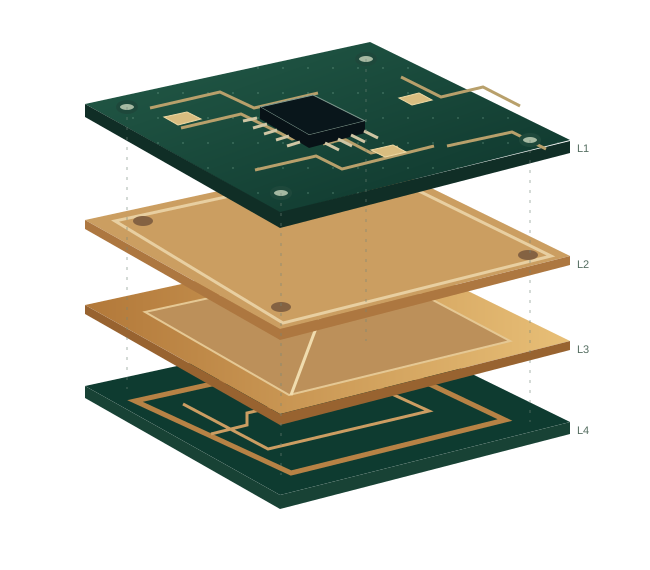
FOUR COPPER LAYERS One considered design.
ILLUSTRATIVE STACKUP / PROJECT-SPECIFIC CONSTRUCTION
↗Prototype to production planning
⊞Fabrication + assembly resources
⌁Interactive engineering tools
▤One file-based project inquiry
A CLEAR PATH TO YOUR NEXT BOARD
4 layer PCB manufacturing. Built on better decisions.
A four-layer printed circuit board combines routing space with dedicated reference planes. The right construction connects electrical performance, mechanical fit and a realistic manufacturing process.
01 / FABRICATION
Turn the design into a build brief.
Define your laminate, copper, holes, finish and inspection requirements before releasing manufacturing data. Start with the details that affect the finished board.
Bring fabrication files together with a bill of materials, placement data and assembly notes. Make component sourcing, inspection and test scope explicit.
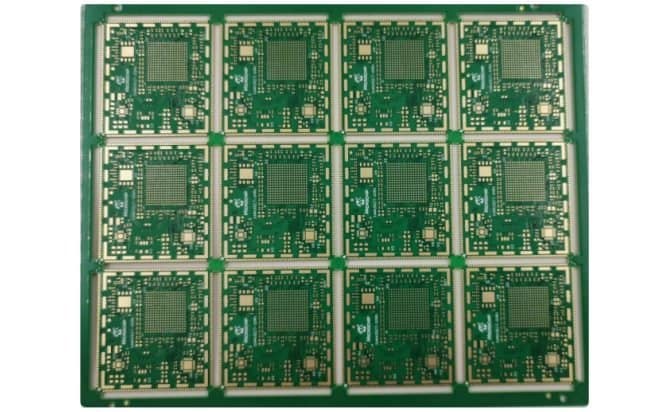
FROM INDIVIDUAL CIRCUIT TO PANELPanelized circuit-board example. Layer count and construction cannot be determined from this photograph.
WHY FOUR LAYERS?
Space for signals. A plan for their return.
A 4 layer PCB can give signal traces a nearby ground reference and reduce the routing compromises of a crowded two-layer layout. That benefit depends on the layer assignment, dielectric spacing and continuity of the reference plane—not simply the number of layers.
01
Organize the electrical structureChoose reference planes and signal layers together. Consider how return currents follow a route and cross layer transitions.
02
Coordinate material and geometryTrace width, dielectric height, copper and material properties all influence a controlled-impedance requirement.
03
Keep the manufacturing brief coherentMatch the stackup drawing, drill files, fabrication notes and revision so a reviewer sees one consistent design.
Signal / ground / power / signal is a familiar starting point. It is not a universal answer.
Some designs benefit from two ground references or a different allocation of power and signals. A split power plane cannot automatically provide a continuous reference for every route. Identify the important interfaces, their reference layers and the board’s mechanical requirements before selecting a construction.
Nominal overall thickness also does not define the distance between a trace and its reference plane. Ask for the actual dielectric construction, material designation and finished copper assumptions when discussing impedance. Our stackup tool adds layer dimensions; it does not predict a fabricator’s pressed thickness or tolerances.
Layer count is one part of a system decision. Compare routing density, reference-plane needs and the cost of layout compromises before committing.
Design question
Two-layer starting point
Four-layer opportunity
When to evaluate more layers
Routing density
Simple, relatively open routing with manageable crossovers.
More flexibility for signals and reference planes.
Dense component escape or several crowded interfaces.
Signal reference
Ground continuity depends heavily on the routing arrangement.
A dedicated reference layer can help preserve a return path.
More signal layers need adjacent, continuous references.
Power distribution
Traces and pours share limited board area.
An internal plane or copper regions can support the power strategy.
Many rails or placement constraints require a different structure.
Cost discussion
Construction may be simpler, but routing or board area can increase.
Balance extra construction against layout and system requirements.
Evaluate total design and manufacturing tradeoffs, not layer count alone.
There is no dependable universal multiplier for a four-layer PCB price. Board dimensions, quantity, panel utilization, material, hole structure, copper, finish, inspection and delivery needs can all affect a quotation. Compare quotes against the same drawing and revision. For assembly, separate bare-board requirements from components, sourcing, tooling and test expectations.
Clear inputs make a useful engineering conversation possible. Manufacturing scope, availability and dates are confirmed for each project.
01 / PREPARE
Define the board.
Collect Gerber or agreed manufacturing data, drill files, an outline and a fabrication drawing. State the revision, quantities and intended application.
Operating temperature, assembly exposure, dielectric behavior and mechanical constraints belong in the material discussion. A high Tg label alone does not describe all of them.
Identify the net, target impedance, tolerance and reference layer. Keep single-ended and differential requirements distinct and resolve construction with engineering.
Industrial controls, IoT, power electronics and instrumentation impose different constraints. Translate the application into a reviewable board requirement.
Start with the decisions you already know. If a requirement is still open, describe the operating context and flag it for review instead of filling in an unsupported number.
A four-layer PCB has four conductive copper layers separated by insulating dielectric material. Designers allocate those layers to signals, power and reference planes according to the circuit. The material and spacing between layers are part of the stackup specification.
Is a four-layer board always better than a two-layer board?
No. A simple design may work well on two layers. Four layers can create useful reference-plane and routing options, but the result depends on placement, layer use, return paths and manufacturing constraints. Compare the complete design rather than assuming a layer count guarantees performance.
Which files are needed for a quotation?
Prepare manufacturing data, drill files, an outline, a fabrication drawing, quantities and the current revision. For assembly, add a BOM, placement data and assembly notes. Clearly mark missing or provisional information so the scope can be reviewed.
Can the online tools approve my design?
No. The tools support planning and show explicit assumptions. They do not analyze Gerber files, validate electrical behavior or establish a supplier’s manufacturing limits. Final construction and acceptance criteria need project-specific engineering review.
How do I request assembly with the bare boards?
Use the inquiry form and describe the assembly scope alongside the fabrication requirements. Include sourcing preferences, BOM and placement data, test needs and any parts you plan to supply. A useful review separates bare-board requirements from assembly and procurement decisions.